One drone platform for every exterior you own
A resident drone, its dock, a tether, a scan and the software that runs it. It maps the property, then cleans glass, panels, walls, roofing and driveways with nobody on site.

Six parts that work as one

A home on the property
On a commercial building the drone lives in a weatherproof capsule on the roof. On a house it lives in a waterproof ground pod. Either way it is powered, sheltered and ready.
Compare the systems
Water and power, always connected
A thin tether feeds the drone water for the whole clean. On the roof it is fed from above; from the ground pod it runs from the same line that powers the pod. Nothing is carried, so nothing runs out.

Built to wash, not to fly far
Short, planned routes across glass, solar panels, walls, roofing and driveways, keeping the tether clear and its sensors on the surface in front of it.
See the surfaces
It maps the building first
Before the first clean the drone scans the property for its structure and dimensions. On commercial buildings it re-scans every two days and decides whether a clean is needed.
How the scan plans a clean
Everything runs from one screen
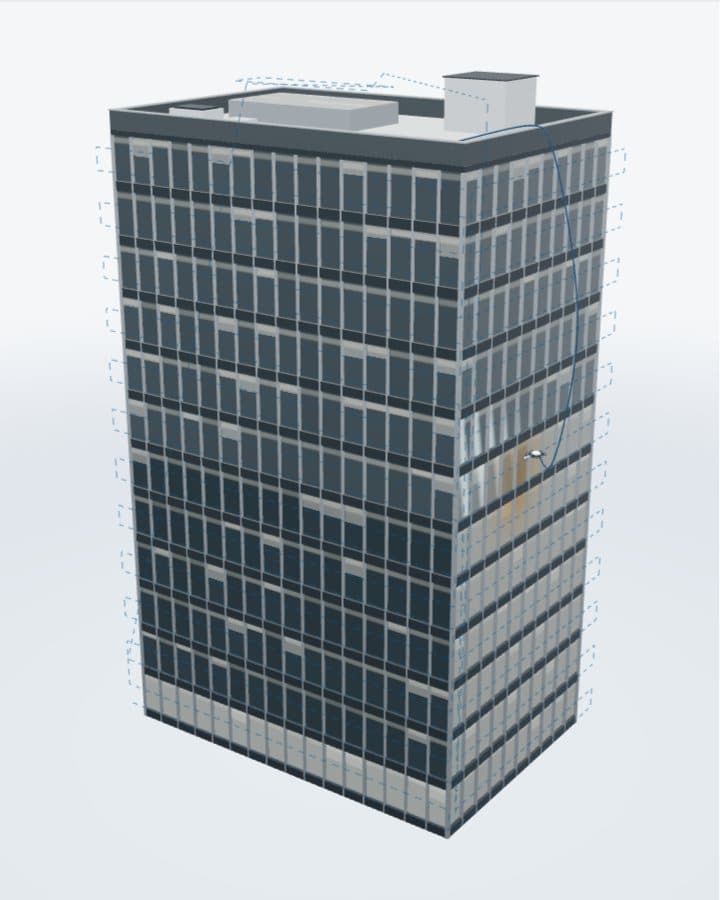
The scan uploads to desktop software that sets the pressure and where to wash, shows a 3D model of the building, tracks the wash live and shades built-up debris.
Lienry Desktop
Nobody has to be there
Once it is set up, the system runs itself. Start a clean from anywhere, or let the re-scan decide. No cleaners to book, no one on site.
Register interestEvery surface, cleaned as its own material
Glass, solar panels, render, roofing and paving all need different handling. The drone identifies each material as it cleans and sets the pressure to suit; you can change it in the software.

Scan first
The structure and dimensions are mapped before any clean.
Pressure by material
Set by the software for each surface, adjustable.
Two passes per floor
The clean moves down the facade in planned passes.
Re-scan
Every two days on commercial buildings, adjustable.
On the roof, or beside the house
The commercial system docks in a roof capsule and is fed from above, for buildings under 70 metres. The home system docks in a ground pod that powers the drone and feeds it water.
What both systems share
- The same drone, scan and software
- A tether, so nothing is carried
- A clean with nobody on site

Cleaned when the building needs it, not when a crew is free
Booked cleans happen on a crew's calendar. A resident drone works from the scan instead: it checks the building, finds where debris has built up, and cleans there.
- A re-scan that shades built-up debris
- A clean you can start from anywhere
- A record of what was cleaned and when

Every clean is planned on a model of the building, and nobody has to be on site
Register interestFrequently asked questions
Which surfaces does it clean?
Five kinds of exterior, each at the pressure set for it:
- Glass: facades, windows and roof glazing
- Solar panels: rooftop arrays and solar farm rows, at the pressure set for solar glass
- Walls: render and other wall finishes
- Roofing: metal roofing among them
- Driveways: on the home system, chosen in the app
The drone sets its pressure for each material before it washes.
How tall a building can it clean?
The commercial system is designed for buildings under 70 metres:
- Where it lives: a weatherproof capsule on the roof
- How it reaches the facade: on a tether fed from above, so it never carries water
- How often it looks: a re-scan every two days, which you can change
How is it kept safe?
It is designed so nobody works at height:
- Tether: water and power stay connected, so nothing is carried
- Obstacle camera: avoidance built into the drone
- Surface checks: onboard, on every pass
- Weatherproof dock: shelter between cleans
Fail-safes are still being finalised.
What happens in bad weather?
Between cleans it shelters in a weatherproof capsule or waterproof pod. Its weather limits are still being finalised.
How much water does it use?
On the roof system the tether is fed from above. Water use per clean is still being finalised.
Does it need rooftop access?
On commercial buildings it lives in a capsule on the roof. What the roof needs is still being finalised.
What permissions will it need?
We do not claim any approvals. Lienry is at concept stage, and what each site will need is still being finalised.
What does the app do?
On the home system the app runs the clean:
- Start a clean: from anywhere, with nobody booked
- Choose the areas: the driveway, the solar panels, the windows, or all three
- Follow it: each area as it is washed, then the house after
Its release is still being finalised.
How does the pilot program work?
We are preparing a pilot program for commercial buildings under 70 metres:
- Who it is for: building owners and facilities managers in Sydney
- What runs: the roof capsule, its tether and the desktop software
- The first step: a conversation about your building
Dates and terms are still being finalised. Book a pilot conversation
What will it cost?
Pricing is still being finalised. We are not publishing prices before the pilot program. Add up what outsourced cleaning costs you now
See the software that runs it
A demo building in the desktop software: the scan, the plan, the wash and the re-scan.
Wash route
4 zones- North facadeDone
- East facade23%
- Roof glazingQueued
- Ground floor shopfrontQueued
This clean
64% of the route
204 of 320 panels washed
- Scan age
- 2 days
- Debris zones found
- 3
- Next scheduled clean
- Thu 07:00
Facade map
- Washed
- One pass
- Pending
- Debris
Model is illustrative. The software will render each property from its scan.